LLM Creator
Coming soon.
Coming soon.
iRECKON
Your computer back.
Every feature inside iRECKON. Built around the agent. You own your AI and your data.
Coming soon.
Coming soon.
Designed for the day quantum computers can break today's public-key encryption.
iRECKON's design uses ML-KEM-768 post-quantum key exchange; it is not yet in the shipped build. The designed substrate seals data in fixed 512-byte encrypted cells (ChaCha20-Poly1305 AEAD, Ed25519 signatures, blind routing tokens); today the cell format is used only by iRECKON's device-to-device messaging, which is in development.
Your data, your keys, your signature.
Per-chunk Brotli + AES-256-GCM encryption with an Ed25519-signed root hash you can verify offline, plus SQLite-indexed metadata; one vault unlock decrypts every archive. (NOT yet in the shipped build: Reed-Solomon GF(256) parity shards + Particle-Swarm-Optimized layout for partial-corruption survival — the designed next layer.)
REAL SCREENSHOTS · LIVE BUILD
Every image below is a direct capture from a running iRECKON OS install — the twin-star Ether desktop, the app grid, Omega at work, a preview of Alfred (coming soon), image generation in Spark, and a live 3D map of the entire OS. Not a mockup.
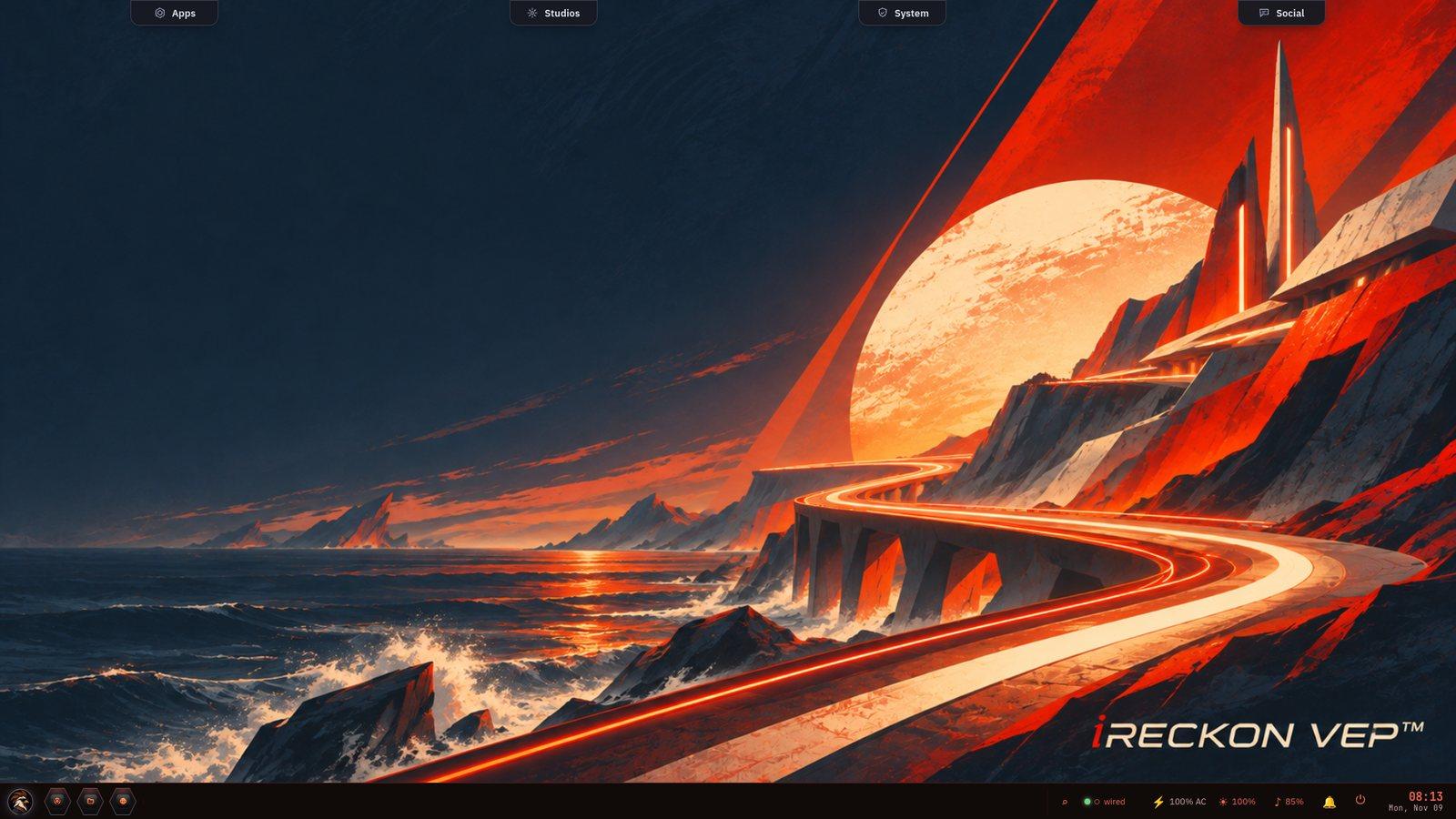
DESKTOP · iRECKON
A full, bootable Linux desktop you own. Four surfaces dock across the top — Apps (your programs), Studios (the creative suite), System (observability and security), and Social. The taskbar runs along the bottom: the launcher, pinned programs, and the system tray — network, power, brightness, volume and clock. Quiet by default — no ads, no upsell, no telemetry.
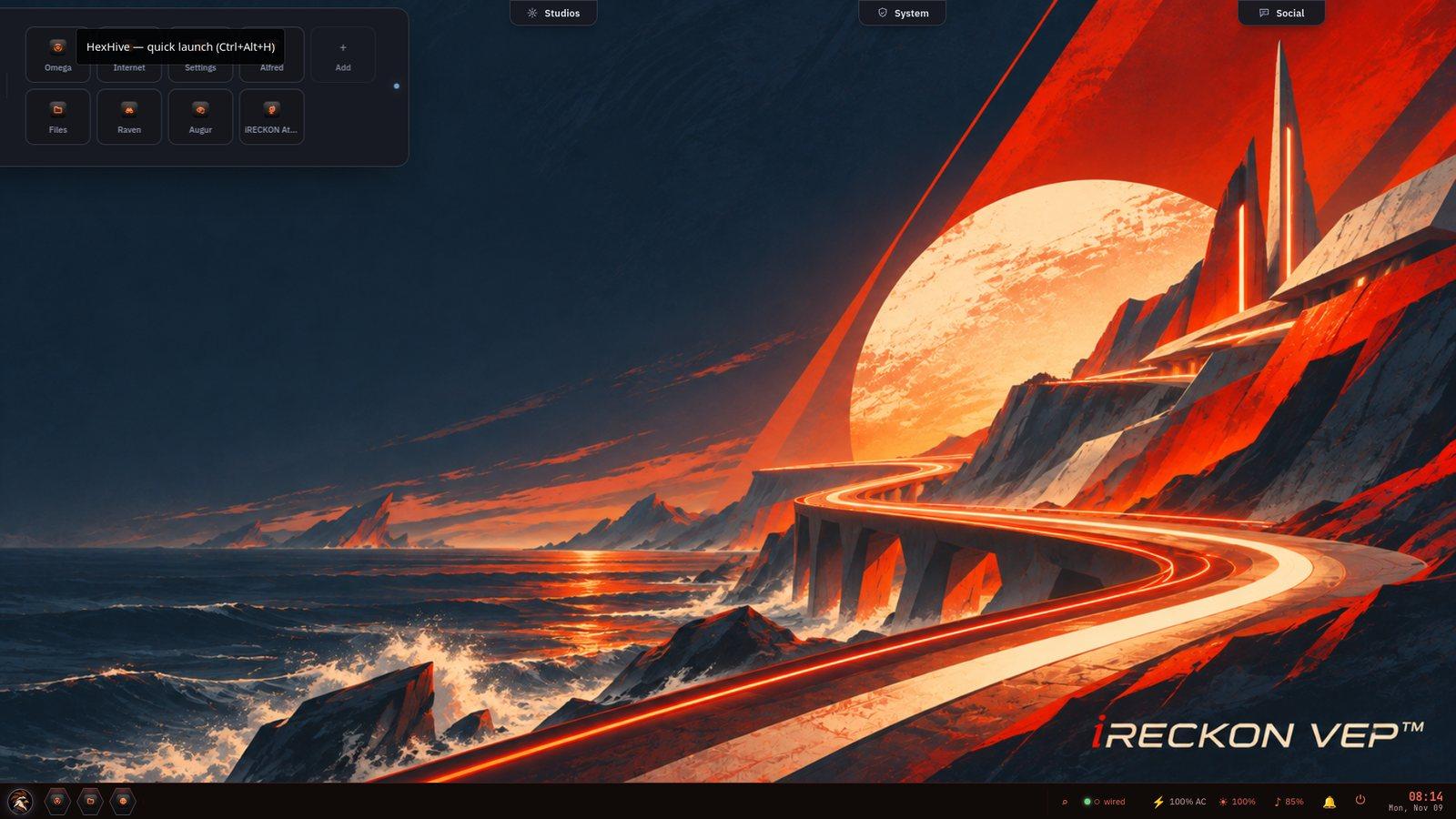
YOUR PROGRAMS · APPS
The HexHive quick-launch: Omega (your on-device AI assistant), Augur (the security gate), Raven, Files, Internet, Settings and iRECKON Attest — plus Alfred, the continuity assistant, which is planned. Pin your own. Programs run locally, on your hardware.
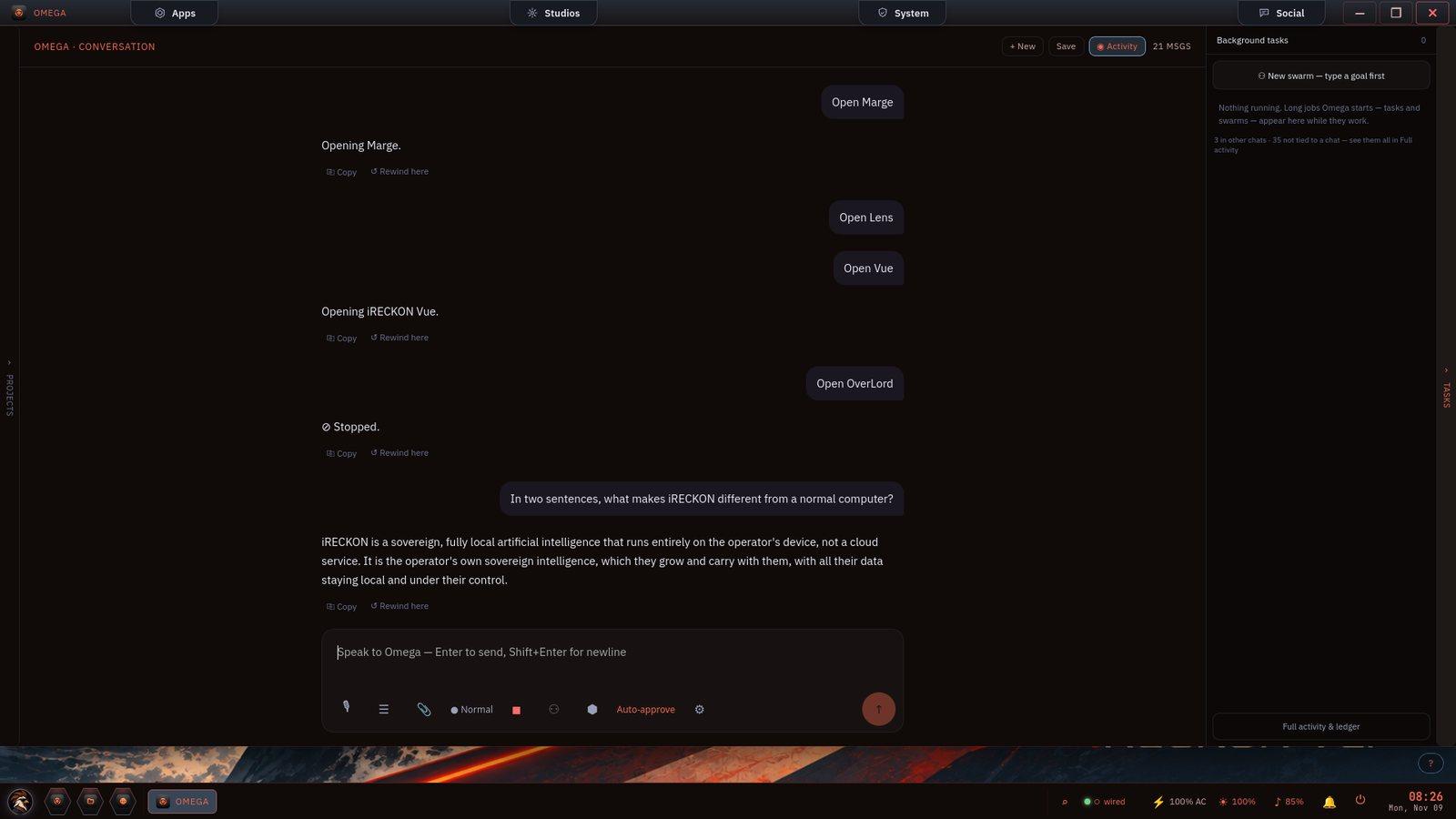
ON-DEVICE AI · OMEGA
Ask Omega anything and it answers on-device. Live here: 'iRECKON is a sovereign, fully local artificial intelligence that runs entirely on the operator's device, not a cloud service.' It also drives the rest of the OS, opening programs from plain language. Local model, no API bill, no telemetry — approval modes and an activity ledger keep you in control.
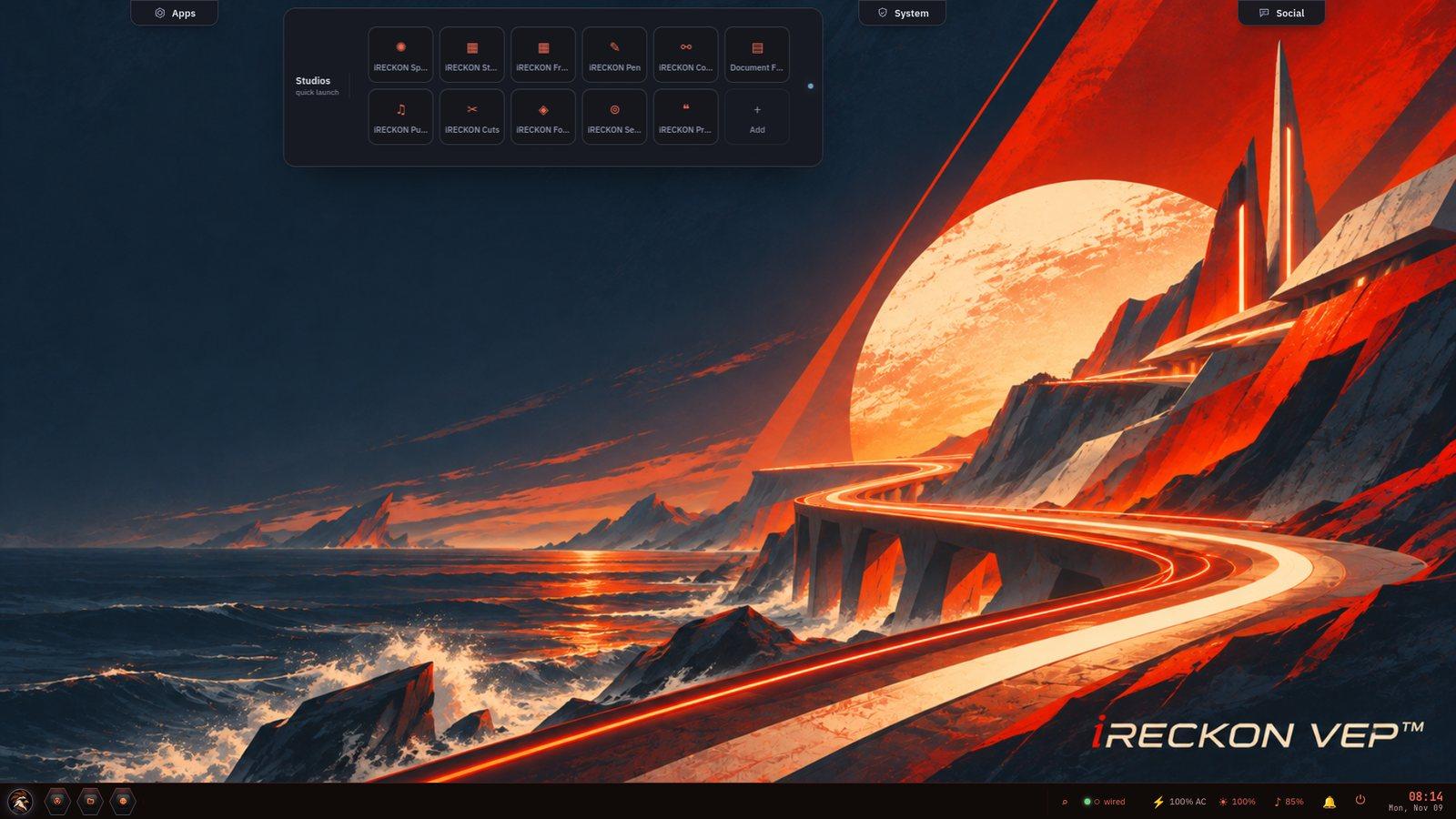
CREATE LOCALLY · STUDIOS
On-device creative studios — Spark (image), Frame and Cuts (video), Pulse (audio; music generation is not available yet), plus Stream, Pen, Code, Forge, Sense, Prompts and Document Forge. Generation runs on your own machine — nothing uploaded, nothing metered.
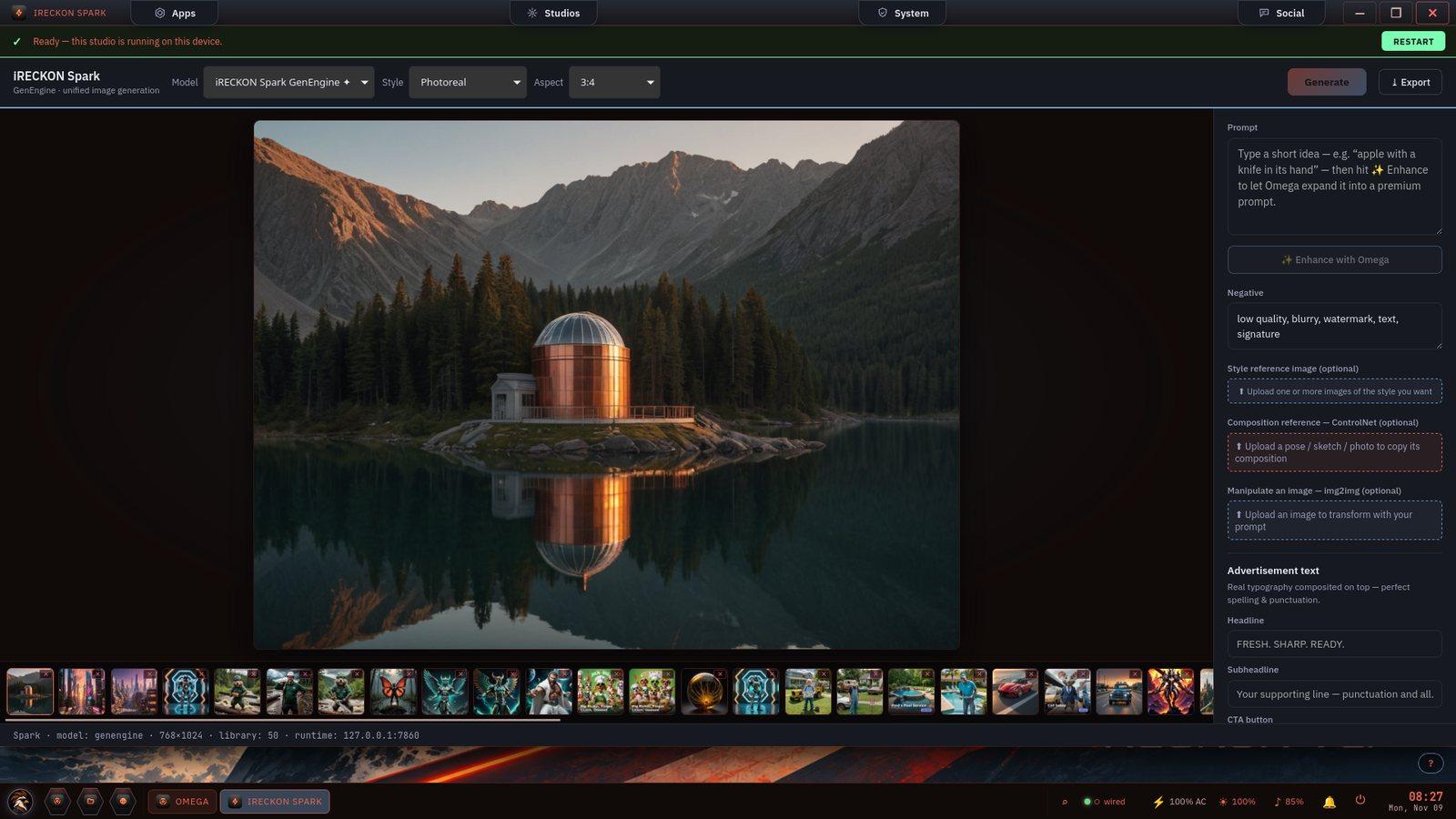
LOCAL IMAGE GEN · SPARK
'Ready — this studio is running on this device.' Type an idea, let Omega enhance it into a premium prompt, choose a style and aspect, and generate — photoreal or stylized — with a gallery of everything you've made. ControlNet composition, style references, and real composited ad typography. Nothing uploaded, nothing metered.
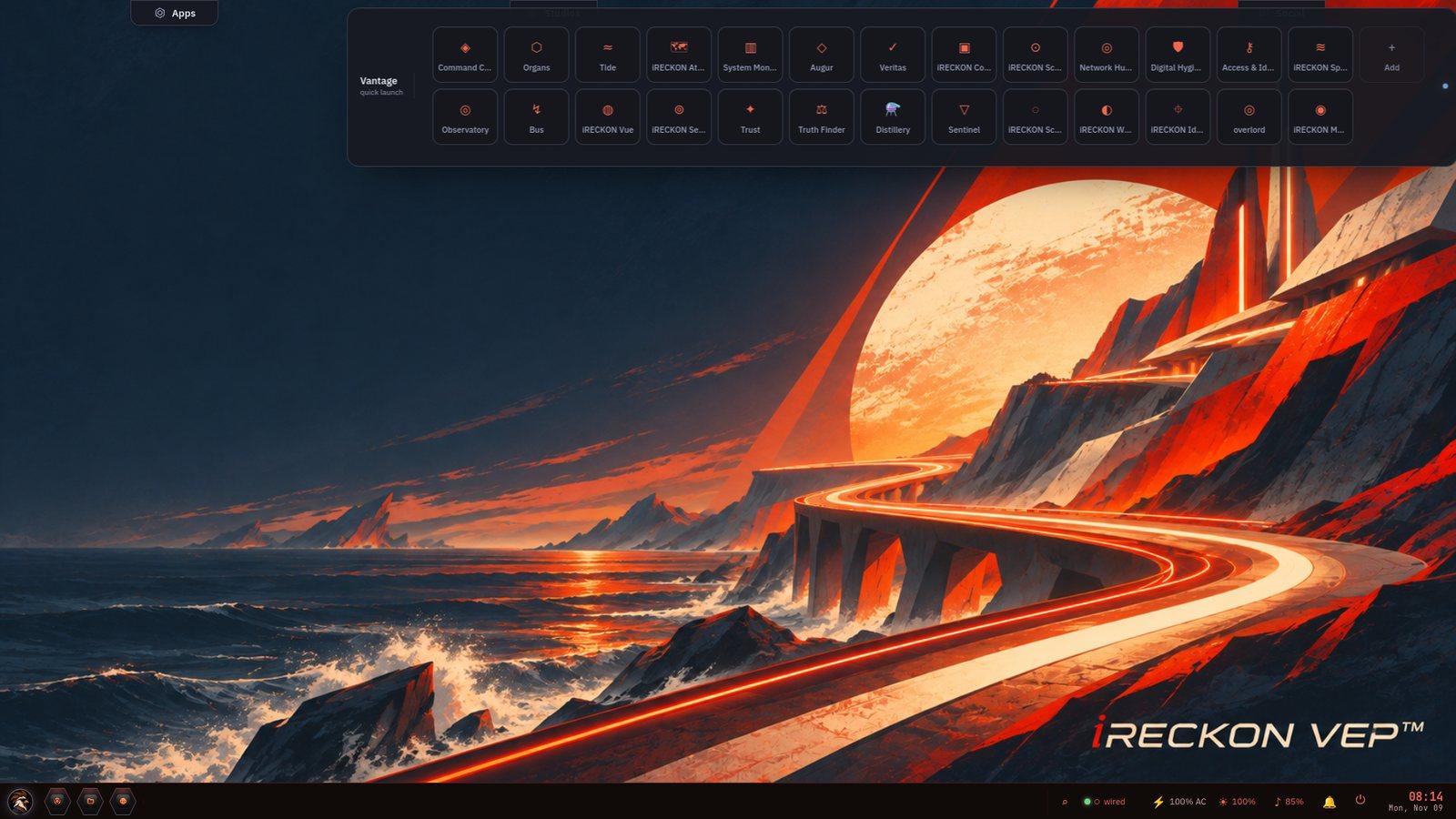
CONTROL & SECURITY · SYSTEM
The Vantage suite — Command Center, Organs, System Monitor, Augur, Veritas, Network Hunter, Digital Hygiene, Access and Identity, Observatory, Trust, Truth Finder, Sentinel, Distillery and more. Observability, defensive security and attestation, all on-device and all yours to inspect.
LAYER 01 · COGNITION
Omega is the decision orchestrator at the heart of every HYVE agent. Same input, same output, every time, under 200 nanoseconds per rule. LLM Creator is coming soon.
Omega is the decision orchestrator at the heart of every HYVE agent. It runs a deterministic decide() function — same input, same output, every time, under 200 nanoseconds per rule — over a topologically-sorted multi-organ topology. Every verdict is replayable in Observatory.
Coming soon.
A design in a pending patent claim, not a shipped capability: routing work across quantum, classical, and local compute.
Three-dimensional graph of organ nodes on a Fibonacci-sphere distribution, lightning polylines for cell deliveries, color-coded by topic class across at least 8 categories. Every decision, memory write, and bus event is replayable.
LAYER 02 · EXECUTION SUBSTRATE
Leaper runs Windows apps (via Wine), containers, Flatpak apps, and retro game ROMs alongside native Linux apps.
SUPPORTED FORMATS
Designed: a four-tier, provenance-keyed execution sandbox (KnownSigned / AiGenerated / UserUploaded / Unknown) that picks each program's isolation from where it came from. Not yet in the shipped build. In the 3.0 build now in testing, code the agent writes for apps runs in a Linux Landlock + seccomp sandbox.
LAYER 03 · STUDIOS
Seven first-party studios cover image, audio, video, motion capture, ambient sensing, API orchestration, and prompt management. Each is scriptable; each is composable; each is built to run on your machine.
Image generation
Audio generation
Video generation (Anima engine)
Markerless motion capture
Ambient context (Aura engine)
1,450 APIs · recipe scheduler
Master prompt library
Cinema is powered by the Anima engine. Sense is powered by the Aura engine; it is in development and needs add-on ESP32-S3 sensor boards. Both are built to run on your hardware.
LAYER 04 · SECURITY
iRECKON's design uses ML-KEM-768 post-quantum key exchange; it is not yet in the shipped build. The full posture lives at /security.
iRECKON's design uses ML-KEM-768 post-quantum key exchange, ChaCha20-Poly1305 AEAD, and Ed25519 signatures; it is not yet in the shipped build. Today files in ~/.hyve/ are not encrypted at rest, and device-to-device messaging is still in development.
Eleven static analysis detectors across five languages: secrets, weak_crypto, sql_injection, command_injection, deserialization, insecure_random, unsafe_audit, panic_audit, xss, regex_dos, ssrf.
A design in a pending patent claim: Augur audits its own source on every commit, so the security tool checks itself before anything else.
A tarpit organ that drips fake banners to attackers for hours, a Tor controller organ with pluggable transports (obfs4, meek_lite, snowflake), and a sentinel kill organ for cross-platform process termination — all audit-logged.
LAYER 05 · IDENTITY & DATA
Your identity lives on your hardware. Your archives live on your hardware.
Sovereign on-device identity: X25519 master keypair and HKDF-derived scoped tokens. No cloud account required.
Per-chunk Brotli + AES-256-GCM encryption with an Ed25519-signed root hash you can verify offline, plus SQLite-indexed metadata; one vault unlock decrypts every archive. (NOT yet in the shipped build: Reed-Solomon GF(256) parity shards + Particle-Swarm-Optimized layout for partial-corruption survival — the designed next layer.)
Part of iRECKON's device-to-device messaging, which is in development: messages exceeding 387 bytes are split via Shamir K-of-N secret sharing applied per byte position over GF(256). Any K cells reconstruct the original; any K-1 cells reveal nothing.
Unlock verification with length-capped inputs, parallel Argon2id derivations without short-circuit, bitwise-AND combination, and uniform error message on failure — defends against side-channel timing attacks.
Part of iRECKON's device-to-device messaging, which is in development: per-conversation epochs with chain-key rotation via HKDF-SHA256 and zeroized prior keys, designed so that compromising the current state does not expose past traffic.
Peer-to-peer LAN file transfer organ — mDNS discovery, TLS-fingerprint pinning, no relay server, up to 8 GiB per file. Transfers go directly between devices on your local network.
LAYER 06 · INTEGRATIONS
MCP Bridge exposes Omega, Narrator, Augur, Trust, and Leaper as native MCP tools — call them directly from Claude Code, Cursor, Zed, or Continue.dev. Full integration guide at /skills.
A standalone binary that exposes Omega, Narrator, Augur, Trust, and Leaper as native MCP tools — call iRECKON organs directly from Claude Code, Cursor, Zed, and Continue.dev.
Per-IDE skill manifests (.claude/skills, .cursor/rules, ~/.continue/config.json) so operators invoke iRECKON organs from inside their AI coding harness without leaving the editor.
Six plugin types with manifest-based install on ports 7900–7999 — Studios, organs, themes, recipes, surfaces, agents — all extendable.
LAYER 07 · HARDWARE
iRECKON targets standard x86_64 desktops and laptops. The minimum specs, the team's own development and test machines, and the explicit unsupported list are at /hardware. Those machines run our development builds; the list is not a compatibility certification. Check your machine against the minimum below.
MINIMUM
4+ CPU cores · 8 GB RAM (16 GB recommended) · ~105 GB free disk · 128 GB+ USB stick · dedicated GPU optional (AI is slower without one) · UEFI or Legacy BIOS · AES-NI + AVX2
RECOMMENDED
8+ cores · 16 GB RAM · 256 GB NVMe · NVIDIA RTX 3060+ for Studios
CLOSED BETA · BY REQUEST
iRECKON is in closed beta — access is by request, not a public sale. Real users help shape real software as it hardens. Full public launch date to be announced. Stop renting your intelligence.
Request Beta Access